My love for technology started early. The only place better than Toys R Us was Radio Shack or a bookstore.
I want that feeling back.
I am going to build an e-ink PDA from an M5 Paper to bring back that feeling. This is my first project using a development board or embedded class device. Wish me luck!
Early Devices
My first PDA was a sky blue electronic diary from Radio Shack. It had the date, time, telephone directory, a calculator, a dice roller, a fortune telling game, and matchmaker. This was my best friend in middle school.
In high school, I used a Royal digital organizer. It had a calendar, a clock, alarms, phone directories, a memo notebook, and a calculator. The calculator could do current conversions. The clock could tell you all the timezones.
I went through Palm PDA's in college. I remember the Palm T|X most fondly as it was the first pocket device I could connect to the campus Wifi. It was the first PDA I had that had color instead of a gray-scale display. As I was finishing my degree, I got a Palm Treo and then a Palm Pre.
Focus and Purpose
I loved PDAs because they helped me stay organized and on task. Sure, you could play games on them but they weren't super involved games. Usually it would be something to kill time while in the supermarket checkout line.
Smartphones were pandora's box for us. With the ability to write powerful software and have it in our pocket, we both increased and decreased productivity. We’ve improved banking and ruined personal free time.
Looking Back and Moving Forward
When I saw the M5 Paper the first time my brain immediately thought, “e-ink PDA.” At the time, I was heavily focused on maintaining my web development career post-divorce. I did not have the time or energy to dive into device development.
This year my career came to a halt when I was laid off from my job. The job market has been tough and I have not landed a new job yet. I decided I need to use this time to expand and sharpen my skills. Now is the time for the PDA project.
Device Overview
The M5 Paper is an ESP32 embedded development board. If you’re not familiar with electronics, this means that it the hardware shipped with minimal software. There is no operating system. I am using MicroPython (Python specifically for tiny computers) to write a PDA system for the Paper.
Paper Specifications
It has a ESP32-D0WDQ6-V3 board inside a plastic shell. If you’re looking on Espressif’s website it is listed as NRND, not recommended for new designs. This phase comes before end-of-life and the manufacturer recommending you use the newer models. The e-ink display is built into the shell with the board (model number is ED047TC1 and it will show up as a LilyGo display depending on the tools you're using) and is 540 pixels by 960 pixels in 16 shades of gray. It weighs only 81.9g or 2.89 ounces. Smaller and lighter than most iPhones, the Paper is about the size of an index card or fieldnotes notebook: 118.6 x 67.0 x 10.0 mm or 4.67 x 2.63 x 0.39 inches. It has Wifi and Bluetooth, as well as three I2C grove ports and a microSD card slot. Like most embedded boards, the on-board storage is measly compared to smartphones, but the SD card slot can support up to 16GB. You can catch the full details at: https://docs.m5stack.com/en/core/m5paper_v1.1
Software Development
The python SDK M5 provides is called UI Flow 2. It’s a Blockly based web IDE for their MicroPython library. The core framework is written in C. Applications can be written in C but Python is more my style. It’s a personal preference more than anything else. Set up involved flashing their UI Flow 2 developer image to the device. Then you can load software and manage the device in Google Chrome over USB. It makes me sad that Chrome is the only browser supporting serial device management but that’s another blog post.
File Management
The firmware they have you flash to work with UI Flow 2 sets up a /system partition, a /flash partition, and you can also access a /sd partition if you have a microSD card in the device. UI Flow lets you manage the files in the /flash partition to files like additional python libraries, fonts, and image files.
Warning! Adding files via the web IDE and then removing them from your project does not actually remove the files from your device. Make sure to manually remove them from the device or you'll run out of storage.
You can access the /system partition on the device with more robust developer tools. I was able to poke around by installing PyCharm and getting the MicroPython Tools plugin. Connecting to the device over serial with those tools shows the /flash and /system partitions.
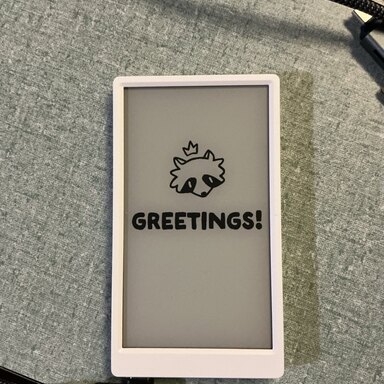
I did the obvious thing and changed the image shown on boot:
Software Goals
The device can be set to boot into main.py immediately. So my idea is to develop a python application to act as the launcher and bring in various other libraries to act as the features of the PDA. We will see how far I can get, but my dream line-up would include:
- calendar and schedule functionality
- to-list functionality
- journaling
- habit tracking
- weather forecast
- contacts directory
- keep-in-touch functionality that helps remind you who you haven’t talked to in a while
- a calculator pad akin to Soulver for iPad, see https://soulver.app/
- notepad / notebook
- password vault
- e-book and document reader
- web-page cacher (maybe something like Wallabag)
Old school Palm fans will remember that caching web pages to read while on the go was a common workflow.
These are productivity tools we’ve all come to know and love, sans the ability lose oneself in pocket gaming or doomscrolling.
My initial focus is on the core PIM (personal information management) functionality of calendaring and contact management. I am currently reading up on the ability of the vcard and iCalendar file standards. I’m writing basic classes for handling these because I do not need the full feature set of the standards, which would be more of a “use an existing library” situation. I plan for data syncing to be file transfers on/off the SD card initially with the eventual goal of also backing up over wifi to a personal server.
Scope
The scope of the project is “personal.” I do not intend to make and sell any devices nor do I plan on supporting the software an open source project. I will eventually share the code, but that’s it.
Bye!
Thanks for reading my project introduction. I hope to have an update for everyone either over the winter holidays or shortly after with information on how the calendaring and contact management are progressing.